
AI authorship note: I created this article with AI assistance. I provided the experience and source material, directed the research and drafting, checked the technical claims and approved the final text.
I needed a simple way to send files out or collect them without asking the other person to create an account. I also wanted to control how long the transfer stayed available and avoid running another server just for occasional file transfers.
FileDrop is the result. It is an open-source file-transfer tool built on Cloudflare Workers, Access, KV and R2. My instance is deployed and in use.
I defined the requirements and security approach, then directed coding agents through the implementation. I tested the result, reviewed the behaviour and configuration, and approved it for deployment and public release. The code is available at github.com/nathanoldfield/FileDrop.
What it does
FileDrop has two sides:
- An operator dashboard protected by Cloudflare Access and email one-time-passcode authentication.
- Public transfer pages reached through short-lived, random links. The person using a transfer link does not need an account.
The same link can be used in either direction. I can upload files and send the link to someone who needs them, or create an empty link so they can upload files for me to collect.
Links expire after four hours by default. The setting is configurable, as are the default limit of 500 MB per file and 20 files per link.
How the data flows
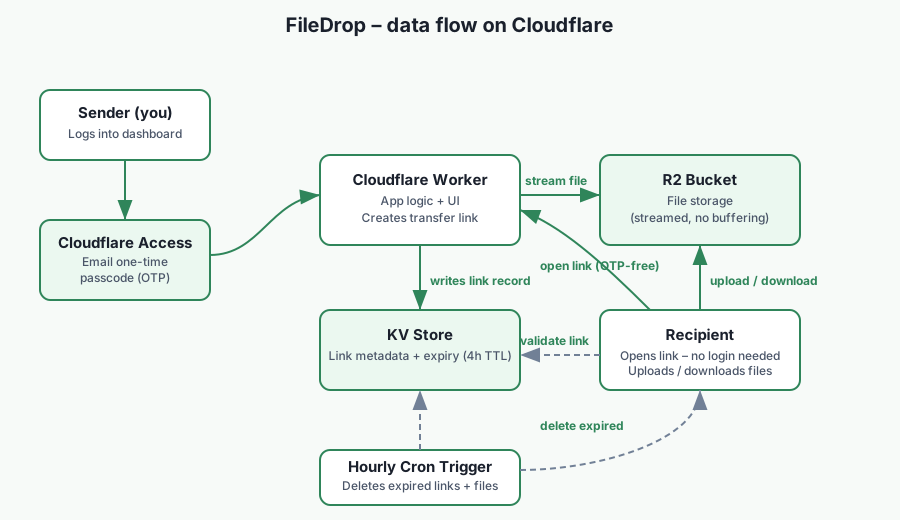
- I sign in to the dashboard through Cloudflare Access.
- The Worker creates a transfer token and stores the link metadata in KV.
- File bodies stream through the Worker into a private R2 bucket. The Worker does not buffer the complete file in memory.
- Anyone holding a valid transfer link can upload or download through its public transfer page.
- An hourly scheduled task removes R2 objects associated with expired or deactivated links.
Cloudflare stores the files in R2. FileDrop avoids a separate commercial file-transfer service, but it does not put the storage under my physical control.
Security decisions
The dashboard and public transfer routes have different security boundaries. Cloudflare Access protects the dashboard, while the transfer routes deliberately use possession of the random URL as authority to access that transfer.
That makes the transfer link a credential. It needs to be sent through an appropriate channel and should not be posted somewhere public. FileDrop generates tokens from 32 random bytes and gives each link a limited lifetime, but it does not add recipient identity checks to the public transfer page.
Cloudflare Access must also be configured carefully. The dashboard routes stay protected, while the transfer, upload and download paths require explicit bypass policies so recipients can use them without signing in.
Cleanup and retention
Expired transfers are cleaned up by an hourly scheduled task. Expiry stops the link from being used, but deletion is not necessarily immediate. A file can remain in R2 until the next cleanup run.
FileDrop is intended for temporary transfers, not long-term storage or backup. I would not use it as the only copy of a file that matters.
Cost and platform limits
The design can fit within Cloudflare’s included usage allowances for light use, but I do not describe it as guaranteed free hosting. Cost depends on current Cloudflare pricing, storage, requests, data transfer and actual usage.
The design is also tied to Cloudflare. Workers request limits, R2 behaviour, KV eventual consistency and Access configuration all affect how it operates.
Other practical limits include non-resumable uploads and individual file downloads. Anyone considering their own deployment should review the current source, Cloudflare limits and security model rather than treating my defaults as suitable for every situation.
Why I published it
FileDrop solves a small operational problem without adding a conventional server to patch and maintain. Publishing the source also makes the design inspectable, including its deployment steps and limitations.
The repository README contains the current configuration and deployment instructions: github.com/nathanoldfield/FileDrop.